Hi there, nice to meet you. Follow me at http://belfong.com/tweets
529 stories
·
3 followers

iMessage Downgrading

1 Comment

Glenn Fleishman:

The odds of this change in standards causing a security breach and your messages being exposed seem unlikely, at least right now. But after scrolling through conversations and seeing what’s going on, I feel Apple has omitted important signals for users when iMessage suddenly stops being used during a conversation.

[…]

The impact of that hit me while revising my book: when iMessage isn’t available, Apple tells you only inline. Despite all the information Messages displays about iMessage being encrypted, the inverse state is faint. This kind of negative knowledge, or information about something not happening, can often be as important as something that does happen. A warning about a fuel tank approaching empty is the kind of information every driver (or pilot) needs, for instance. If you think end-to-end encryption—or Apple-based encryption—is critical for you, then a pop-up message or other warning is what you would expect.

[…]

If you’d like to prevent Messages from downgrading security, you have options, although they may not be fully desirable. All of these are managed on an iPhone at Settings: Apps: Messages. You can’t control these message settings from an iPad or Mac.

This recently happened to my mother, and it was very confusing for her. For unknown reasons, while at home on Wi-Fi, she got signed out of iMessage. But it was not clear to her that this had happened or that she should try to sign back in. She was not aware that the Messages app supports multiple protocols or what the different bubble colors mean. All she noticed was that certain messages (e.g. ones sharing files) would no longer send and that she was not receiving some of the messages that people were sending to her. She saw the inline warning about encryption and interpreted it as that the sender was using a newer form of encryption that her phone didn’t support, so maybe she needed to upgrade.

I went over to take a look and quickly figured out that she was signed out of iMessage, but I couldn’t fix it. I kept getting errors that iMessage couldn’t be activated, even after rebooting the phone. Eventually, much later and again for unknown reasons, activation succeeded.

Read the whole story
Belfong
17 hours ago
reply
I find that I cannot get SMS, especially those that will send me OTP codes, when I have Wi-Fi calling turned on. When I turn it off, SMS arrives instantly.
malaysia
Share this story
Delete

Passkeys Attestation Trap

1 Share

The Hack (Hacker News):

Like the Trojan Horse, passkeys are legitimately elegant on the surface, but there is something troubling inside.

What’s important to know is that unlike with any other kind of login credential, you do not have ultimate control over your passkeys. With passwords, you can choose where to write them down; with authenticator apps, you can decide for yourself which ones to use (they’re pretty interchangeable); and with physical security keys you can hand them to your colleague if you really trust them. But with passkeys come a hidden dial that lets the websites you use them on gradually remove your ability to do as you please with them.

[…]

This is the feature that means you no longer get to make the calls about your passkeys. Fortunately, attested passkeys are not yet required on most websites. But the FIDO Alliance standard makes attestation a part of the passkey ecosystem, whether you want it or not. And even if the website doesn’t require attestation now, simply by using passkeys you indicate to the website that your setup supports the FIDO Alliance’s passkey standard and that you as a user are capable of using passkeys. This means that once Twitter (formally X) is satisfied that the overwhelming majority of its users would be unaffected, they can flip the switch – perhaps not all at once, perhaps just for ten thousand users at a time so as not to cause a fuss – and start rejecting non-attested passkeys.

[…]

My expectation is that the industry will start off with very few constraints on your passkeys, and gradually add more and more, not all at the same time, but staggered on different sites, and then in a few years people will forget that they were ever offered a choice in which security measures they want to enable on their passkeys (if they even knew there were different kinds of passkeys at all).

[…]

Remote attestation can allow them to verify that your device is not capable of, say, sending and receiving encrypted messages, or running a competitor’s app, or using social media without verifying your ID.

Apple’s passkey implementation currently does not support attestation, but it sounds like this is only until they can work out how to do syncing:

Attestation was designed to attest to a specific device, exclusively at the point of creation, with a specific set of security properties. It doesn’t make sense for synced credentials for a number of reasons, including syncing to devices with different security properties, changes in security properties that happen after key creation, security properties of the sync fabric, sharing the passkey, or exporting to other passkey providers. We’re working hard with W3C and FIDO to solve these problems.

Ricky Mondello:

The post is predicated on the idea that a feature of WebAuthn called “attestation”, which is only used in high-assurance and usually corporate scenarios, and usually with physical hardware security keys, will be leveraged to hurt people, somehow.

The post posits that a website like X will bait and switch users: first, you get a passkey. Then, later, scary “attested” passkeys! This simply isn’t possible to do because attestation isn’t supported on the web for mass market, consumer authentication.

Attestation for passkeys (software-based, syncable credentials) is antithetical to their mass market goals, and would freeze out independent, non-corporate-backed credential managers. It’s an explicit non-goal of the designers of passkeys, who work together in a forum anyone can join.

And trust me, websites and apps like banks repeatedly asked for attestation at the beginning of the industry’s passkey journey. The platforms, browsers, and credential management apps have held firm that the goal of passkeys is reducing phishing and not some kind of trusted computing scheme. (And I will note: over my dead body!)

I believe this is not the goal of Mondello and some of the others working on this, but so far I’ve not been convinced that they will be able to control it. It sounds like Apple is working on it, and once the technology is out there, what’s to prevent key sites from forcing it on users? It seems like all this would take is the cooperation of a few big credential managers. This would be to their benefit in the sense that it would make their products required. Smaller credential managers who resisted would be frozen out.

varx:

The fact that websites and apps have been asking for attestation just reinforces the main point of the passkeys post! Sure, browsers aren’t supporting it yet, but that’s the sort of thing that can change, and the sort of thing that has changed in the past. See the footnote on Widevine and Firefox. (“Currently not supported” is also very subject to change.)

And we already have sites and apps allowlisting passkey vendors. That’s no theoretical, slippery slope fear -- it’s a real restriction on user freedoms that’s already happening right now.

I don’t think that a couple of bad points (e.g. the TOTP thing) invalidate the main point of the post, because the post wasn’t an argument from authority. The author makes some good points that stand on their own.

Ricky Mondello:

To be clear, the websites have stopped asking for attestation. Or at least, they’ve stopped asking me. Why? Because they know there’s no use in asking — that the OS vendors, browsers, and passkey managers are unified on this front. And now they’ve seen firsthand that passkeys without attestation are awesome and a big step forward.

iinuwa:

This is antithetical to users, as the types of authenticators that can pull this off are difficult to use (security keys). Companies with IT departments who can do account recovery for the user can handle this, an average user cannot. Synced passkeys are the answer to this for consumers and therefore attestation does not belong in the consumer space. Which is why password managers are in the spec groups pushing back against this every time it comes up.

Scott Helme (Hacker News):

If a consumer website decided tomorrow that it would only accept attested passkeys, it would lock out almost all of its own users, instantly. What website is going to do that?

[…]

If you’re worried about attestation creeping into consumer logins, then that’s worth pushing back on, loudly (if it ever happens). But it hasn’t happened, the biggest providers don’t support it, and avoiding passkeys today while you wait for it won’t protect you from anything, it just leaves you open to phishing.

It seems like rejecting passkeys is the only way the average user has to push back. The main thing protecting us is that sites don’t want to lock out their users who rely on passwords and 2FA. Once most people have adopted passkeys, if Apple and Google sell us out, I don’t think it matters much what the rest of the alliance thinks. Sites would be able to require attestation with the assurance that users could easily comply. Safari would probably opt everyone into attested passkeys, as it currently opts you into passkeys in general (unless you uncheck “Allow Automatic Passkey Upgrades”).

Previously:

Read the whole story
Belfong
4 days ago
reply
malaysia
Share this story
Delete

Schoolboy, 15, loses hand after picking up police stun grenade during French school protests

1 Comment

Prime minister orders ministers to tackle students’ five major demands, including organising replacement teachers and school repairs

Hundreds of schools in France remained fully or partially closed on Monday as teenagers continued to blockade buildings and the government struggled to contain the biggest youth protest movement in years.

A 15-year-old protesting against what the demonstrators say are France’s dilapidated ⁠and understaffed ​schools ‌had his hand ‌blown off on ‌Monday in the northern town of Lens, the local prefect François-Xavier Lauch ‌said.

Continue reading...

Read the whole story
Belfong
15 days ago
reply
They are all so young. How do they know to stand up against a government? I hope there are no shadowy figures inciting these behaviours. Those are the worse kind of persons.
malaysia
gentledevil
15 days ago
"shadowy figures" aka cops...
Share this story
Delete

Grok Bot

1 Comment

SpaceXAI (MacRumors):

Grok Bot is in beta and available today for SuperGrok, SuperGrok Plus, and SuperGrok Heavy; Cursor Pro, Pro+, and Ultra; and Cursor Teams Standard and Premium subscribers on desktop and iOS. Grok Bot comes with its own usage, separate from your Grok and Cursor plans, so anything you hand off to a Bot won’t count against your existing usage. Download the app, create your first teammate, and start handing off work.

[…]

Inside SpaceXAI, that already looks like real, multi-step coordinated jobs being handled: a sales Bot updating the CRM with call transcript notes and drafting follow-ups, an ops Bot seating new hires and processing invoices received in Gmail, and an engineering Bot reproducing a bug in the product UI, filing the ticket, and handing the fix off to a debugging Bot.

[…]

People inside SpaceXAI often run multiple Bots in parallel, with one to manage the others. A chief of staff sits on top, with a specialist for each lane: inbox management, expenses, recruiting, bug fixes, or operations. Instead of multiple agents you have to manage, Grok Bot gives you a small team that can work in parallel so you’re not the middleman.

Artificial Analysis (Hacker News):

Grok 4.6 gains 5 points over Grok 4.5 on the Intelligence Index just over one month after its release, or +23 points compared to Grok 4.3. This brings SpaceXAI back to the intelligence frontier alongside OpenAI, behind only Anthropic.

Kun Chen:

i’m 80% sure Grok Bot was originally built by the Cursor product team, and got rebranded after the acquisition

John Bai:

Believe it or not, the original Grok Bot started as an exploration of what an ambient computer assistant might look like.

I wanted to give an expressive face to a helper that could also use your computer. The character evolved, but that sense of presence stuck around.

Dare Obasanjo:

A real dilemma. People whose opinions on tech topics I take seriously are saying good things about Grok Bot.

It sounds like it nailed OpenClaw/Hermes for the masses but as a point of principle I don’t use MechaHitler. I would love an overview of what it gets right that everyone else missed.

I don’t trust xAI (or Meta) with my data, but it doesn’t seem like Siri AI can do all that much. So far, I’ve been too busy to do much with agents, even on a test Mac. But I don’t think agents are going away, so there’s a tension here that will need to be resolved eventually. My guess is that most people will throw caution to the wind in order to get results. Maybe Google will have something more trustworthy and powerful by then.

Previously:

Read the whole story
Belfong
22 days ago
reply
Grok, Muse, Siri AI and lots more. We are in interesting times.
malaysia
Share this story
Delete

Microsoft Took the ‘Copilot+ PC’ Brand Out Behind the Shed

1 Comment

Zac Bowden, Windows Central:

In 2024, Microsoft and Qualcomm kicked off a new category of Windows hardware it called “Copilot+ PCs” that set the baseline for a new wave of AI-first computers, and launched with exclusive features that would not be made available on PCs that didn’t meet a new set of system requirements.

The launch didn’t go smoothly. [...]

I’ve noticed that none of the Surface PCs launched in 2026 include the Copilot+ PC moniker in their product names, unlike the Surface PCs that launched in 2025 and before. Now, you have to go digging to find any mention of Copilot+ compatibility in specification sheets.

Microsoft’s had to dig a lot of holes in the ground behind that shed over the years. The lesson here is that good devices are just good devices. A good PC is going to be a good PC for AI too. Wasting time with special branding is a distraction from the core task of just making the devices good.

Link: windowscentral.com/microsoft/windows-11/the-copilot-pc…

Read the whole story
Belfong
22 days ago
reply
When I first heard of Copilot PC, my impression is that these are Qualcomm (Arm based) PC. This brand is a clear tangent away from the usual processor powered by AMD and Intel. And being Arm, they signified longer battery life with powerful performance per watt. Now that Microsoft is dropping this branding, are they saying they are not going to produce Qualcomm powered PC?
malaysia
Share this story
Delete

Just the Links, please

1 Comment

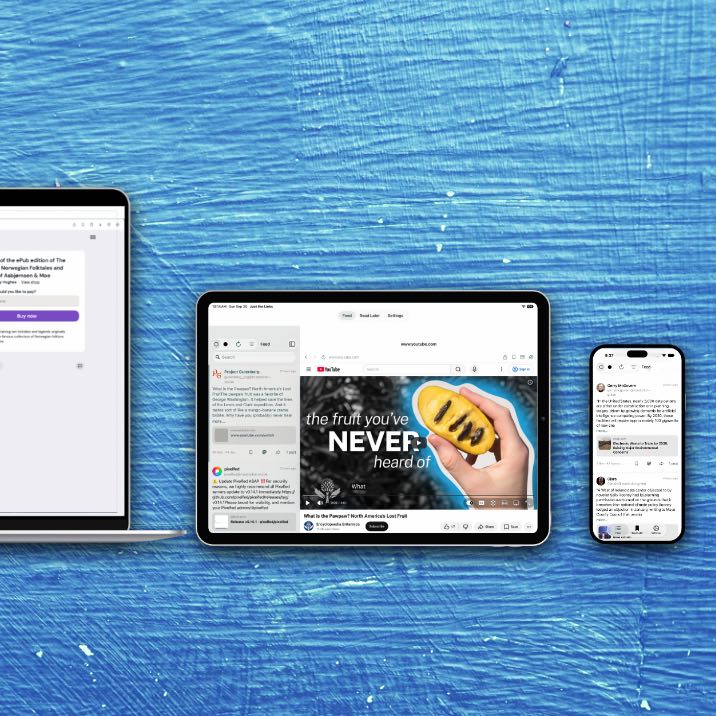
I built a new app because I was tired of scrolling past jokes, quote-posts, and the same article six times on social media. I also didn’t want to miss great articles from sources not in my RSS feeds when I wasn’t plugged in for a while. When I’m ready to read, I want the links. Just the links, and all the links.

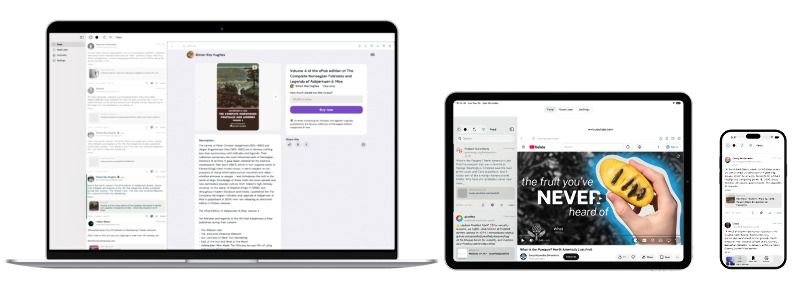
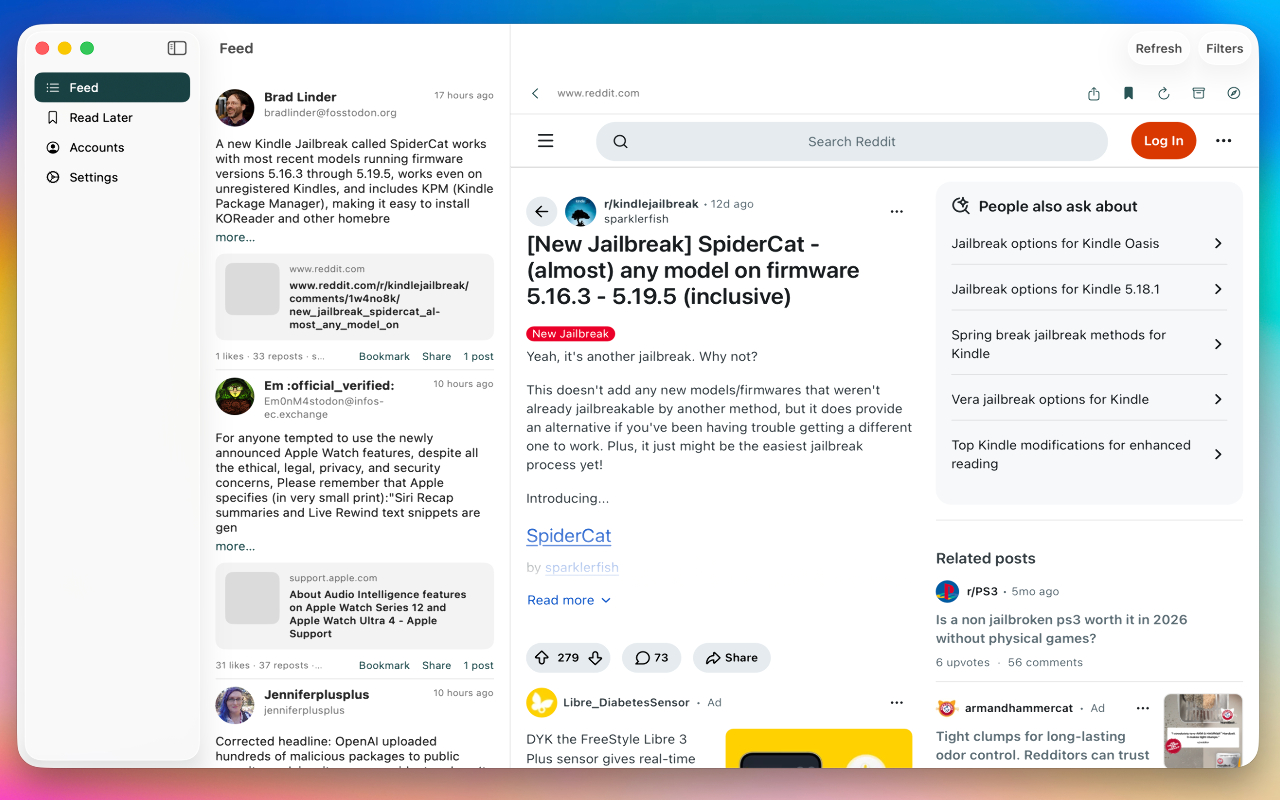
Just the Links is a native app for iPhone, iPad, and Mac. It reads your Mastodon and Bluesky timelines and turns them into one feed of articles people actually shared.

Not to step too much on Murmel’s toes, mind you, I just wanted a native app with bookmarking and cloud sync. Murmel is still a great option with RSS feeds and digest emails, neither of which Just the Links provides. I’m using both.
What it does

Sign in to one or more accounts. Pull home, lists, or public/explore sources. The app grabs destination URLs from post text and link cards, throws out mentions, hashtags, and platform profile links, then groups the rest by URL.

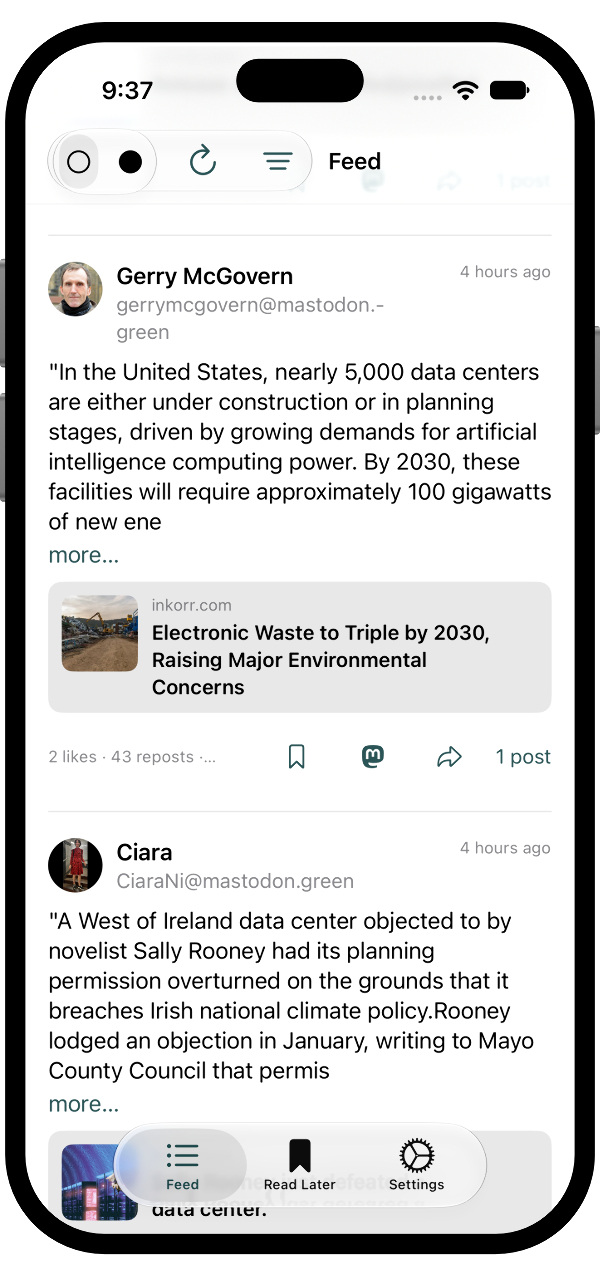
One row per article. The face of the row is the social post that pushed it hardest, with a card underneath for the link. Expand the row if you want to see everyone else who posted it, and boost or repost from there.
Why I wanted this

I like Mastodon. I like Bluesky. I do not like treating either one as a reading list. By the time I tap through, I have already seen the same Verge piece from four people and still have not opened it.

I see an app like this as a modern RSS reader for people who don’t have time to keep up with a bunch of RSS feeds. Follow the right people/news outlets and get all of the links they post, in order, in one place.

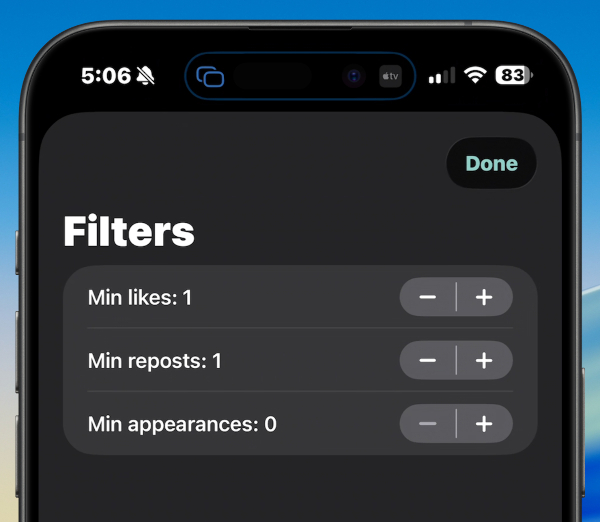
This app is closer to a focused cousin of a timeline client than it is to a bookmark manager. The post stays in front. The link is nested. Filters sit on top if I only want things that showed up more than once, or that picked up some likes.
Accounts and filters

With a paid subscription, you can add unlimited accounts across Bluesky and Mastodon. For each account you can choose what to pull: home, lists, federated, or local feeds. If you’re following people that post links of interest to you, you can just watch your home feed or a list. If you want to see a broader selection, choose local or federated. That will show you all of the links on your Mastodon server or wider federated links.

There’s one set of filter options that applies to all accounts. You can determine a minimum number of likes, reposts, or appearances that a link has to have to show up in the feed. I like to set likes/reposts to 3, and appearances to 1, which often surfaces blog posts from people I follow without requiring a bunch of people to have linked to it, while keeping my list fairly tidy.

Reading, saving, and sharing

Tap a card and it opens in an in-app reader. You can send it to Safari, archive.is, or bookmark it to your Read Later view. It even integrates with Read Later services like linkding, Pinboard, Instapaper, and Marked Share. Read Later syncs with iCloud, along with accounts and filter settings. Tokens live in the Keychain. There is no server of mine in the middle.

On a Mac or landscape iPad you get a split view: the list on one side, the article on the other. That’s the version I’ve been using the most.

You can boost or repost right from the app. Just The Links will show the “heaviest” appearance of the link (most shares, most popular account, etc.). Tap the “X Posts” at the bottom or the user icon at the top and you’ll see all of the accounts that have shared it, each with boost and repost buttons. I don’t have Quote Posting enabled yet, but you can also click the Mastodon or Bluesky icon on the individual post to open it on Bluesky or Mastodon, where you can interact with it as usual.
Full keyboard support

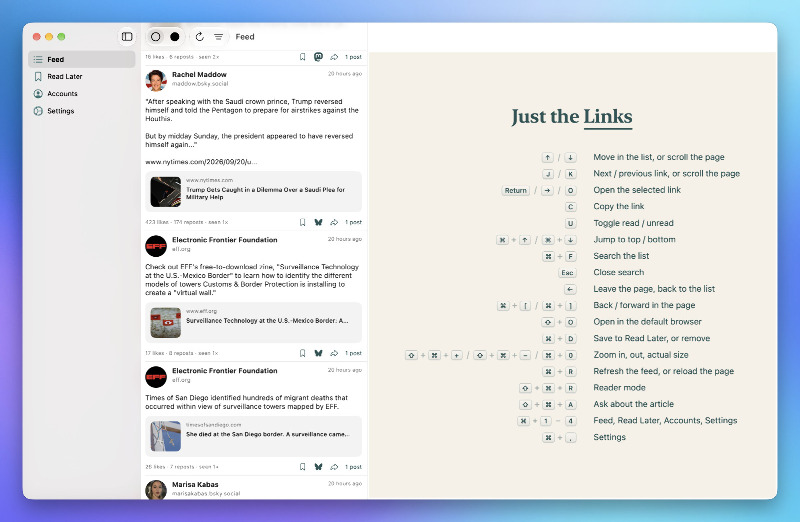
As with all things I make, attention to keyboard shortcuts is a big deal. You can navigate lists with arrow keys or vim-style j/k, open links with a right arrow or o, save to Read Later with ⌘+D, and more.
Readability and Apple Intelligence

Mozilla Readability is built in. Whenever the browser is focused, you can hit ⇧+⌘+R (or the toolbar icon) to open the article without any menus, ads, cookie popups, etc. This works with any article you can load, even if it requires a login.

If an article is paywalled and you don’t have an account, you can try the Archive button to see if it’s been saved to the Wayback Machine. If it has, you can read it in full. If it hasn’t, you can submit it for archiving.

Hit the Apple Intelligence “sparkle” button (or press ⇧+⌘+A) to get an AI summary of an article, along with a chat box where you can ask questions. Available on any device that has Apple Intelligence enabled.

Join the Newsletter

You can sign up for the Just The Links mailing list on the site. This list will be used to announce the release, as well as development news.

I do tend to use these individual app lists to promote my other apps and offer discounts, but I’ll never sell the list and you’ll only ever hear from me.

Try it

It is a small subscription: $1.99 a month with a week of trial, or $19.99 a year. Family Sharing is on. It will work for free with one account and no read later list. I am not asking you to trust a backend; the work happens on the device.

You can join the TestFlight from justthelinks.app right now. iPhone, iPad, and Mac. If you’re interested in seeing the most popular links from people you actually follow (or want to discover), check it out.

Like I said, if you’d rather wait to hear when it’s released, or want to keep up with major developments, join the mailing list.

About the TestFlight

I don’t intend to test this one for long, but I’d love your feedback before release. Join the TestFlight for free and get full functionality. You can use the Purchase buttons with any subscription type to test, you won’t actually be charged. As with any TestFlight app, purchase buttons are there just for testing and don’t really subtract anything from your account. Give it a shot on Mac and iOS and report any issues. You can also send feedback directly to me using the support email.

Like or share this post .


BrettTerpstra.com is supported by readers like you. Click here if you'd like to help out.

Find Brett on Mastodon, Bluesky, GitHub, and everywhere else.


Read the whole story
Belfong
27 days ago
reply
Seems interesting...
malaysia
Share this story
Delete
Next Page of Stories